

NGCTool
Application

Get the highlights.


NGC Electronics Update.
A clean environment for NGC electronics connected to smartphones.
Clear information allowing you to see directly if an update is available for your NGC electronics.


A green dot indicates whether a new update is available that is superior to the NGC electronics update.
An orange dot indicates older, obsolete firmware versions.
A red dot indicates updates that do not affect the NGC electronics recycler.
Follow the overall progress of the NGC electronics update.
The update is divided into 3 steps:
-
Firmware download,
-
Firmware installation for the Main PCB,
-
Firmware installation for the Handset PCB.

Complete!

Download in
progress

Setting up his dive
has never been so simple.
NGC Tool allows you to control your NGC electronics from your smartphone.
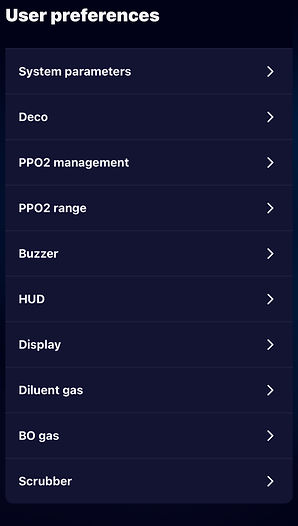
The user preference settings include:
-
The system settings that allow system configuration such as language, units, and water type;
-
The deco in order to configure it for decompression;The deco in order to configure it for decompression;
-
The management of PpO₂ to determine the mode of PpO₂ management and to configure the SetPoints and their changes – only for the NEPTUN®;
-
The HUD PpO₂ ranges;
-
The vibrator in auto or manual mode;
-
The HUD on the frequency and intensity;
-
The display with its personalised theme as well as its brightness intensity;
-
The diluent gases for the future dive;
-
The bailout gases for the future dive;
-
The canister to configure one's autonomy meter.


Everything is in the dive log.
With the NGC Tool app, always have your dive information at your fingertips. Export your NGC dive log to the NGC Tool app.
The graph is customizable. Filter by the data you want (PpO2, mV, temperature, decompression, etc.) and, thanks to the timestamp, you can track your progress throughout the dive.
A dive summary provides essential information such as the dive start time, duration, and maximum and average depths.


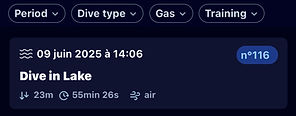
The dive log, in list format, is organized chronologically.
The NGC Tool app allows you to filter your search to find the desired dive or specific information based on:
-
dive type,
-
gas used,
-
time period, or
-
training dive.
A short summary with pictograms provides essential dive information.


On the dashboard, we have…


HELIOX

Diving in the sea, with air, in caves, with trimix...
When uploading your dives, provide information about your dive, such as the environment and the type of gas used.
The application analyzes all the data to highlight the trends of your dives.
AIR


O2

Your activity:

Trimix
The average time:

The average depth:


Join us on your mobile!


